Smarter AI chapter-adding options
We've rebuilt how the chapter-adding options work to be easier, smarter, and more powerful—all without costing you extra credits!
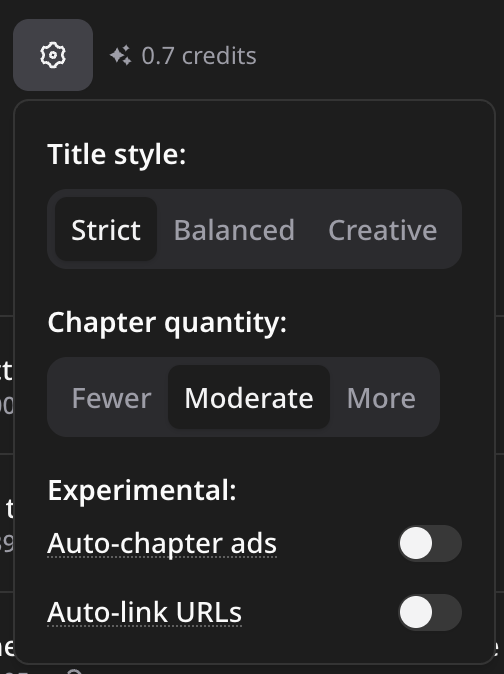
For adding chapters from AI suggestion or your outline, we removed the former mode selector that had expensive options. Now, everything uses the same model so we can charge the same cost.
For AI-suggested chapters, you now have two new options to give you great control over your chapters:
- Title style—This affects the way your chapter titles are worded: "strict," "balanced," or "creative." "Strict" attempts to be most accurate to what you said, which is ideal when you speak your outline in your podcast. "Creative" will be similar, but get more creative, sometimes representing the idea of the chapter better. And then "balanced" attempts to be a combination of both.
- Chapter quantity—This affects how liberal the AI gets with suggesting chapters, with straightforward "fewer," "moderate," and "more" options. "Fewer" looks for the higher level divisions of your content, which is especially good when you speak your outline. "More" will add potentially many more chapters (which you can easily edit or delete).
Lastly, we added two new experimental features to both chapter-adding methods:
- Auto-chapter ads—This will attempt to recognize any baked-in ads in your podcast and turn them into chapters, which can make your ads more engaging and actionable because you can change the title, image, and add your call-to-action link so your audience can easily tap to visit the link!
- Auto-link URLs—This pairs nicely with "auto-chapter ads," but can also work without ads. It attempts to recognize whenever you speak a URL and uses that as the chapter URL. This performs better when your chapter quantity is higher so that PodChapters can ensure each URL has its own chapter.
Please let us know how these new features perform for you!